Showing posts with label Java. Show all posts

Tuesday, 2 June 2020

Hello again, World...

I've neglected this little corner of the web for nearly three years, shame on me!

A lot has happened in that time. I was promoted at work (Yay!)... Then I was made redundant when the company folded (Boo? Hiss? Maybe, maybe not, I'm undecided...). Our children celebrated some birthdays - our eldest is now 6, and our youngest is 3. I suppose we got a little older too, but the less said about that the better! I've taken care of some real world projects - mostly satisfying physical work involving wood and concrete and hand tools and sweat. Oh yeah, and the whole goddamn world has been turned upside down thanks to a global pandemic. Fun times!

When I've not been homeschooling the girls, hiking in the amazing countryside that is rather conveniently situated right at my doorstep, completing practical projects around the house, reading all the things, and vegetating in front of netflix, I have been pratting around with my fingers on a keyboard tinkering with various software projects.

Absolute emphasis on TINKERING.

There has been little in the way of reasoning behind what I've been messing with other than "I am currently the master of my own destiny, I have some technology on hand, a brain that needs exercise, and although the libraries are sadly shut we do have an amazing resource called t'interwebs on hand these days, so why not just have some fun". Sure, keeping my brain active and tinkering with Java/Go/JavaScript might have some practical benefits when it’s time to find a new job, but that's as far as it goes. My mindset is firmly back to that of my 10 year old self, hacking away on a ZX Spectrum programming Sinclair Basic just for fun :D

So, what software projects have I been fiddling with, you might ask... Well, there are a great many, but here's the top ten (ok, ok, it’s less a top ten and more a list of things I've worked on most recently and/or not already forgotten about). In no particular order:

1) I started (well, nearly finished) working on my very own retro style minimal Simple RPG. I don't really know why I've not finished it if I'm honest. Developers and their goldfish-like attention spans eh? I'll probably blog about this project separately and add a link (or maybe forget to add a link) here when I do.


2) I rewrote theinvader360.com in Go. Almost entirely pointless, it could quite happily be a static site, but I wanted to so I did :) Yes, you *will* see a pattern emerge in my justification of how I choose to spend my limited time on this planet...
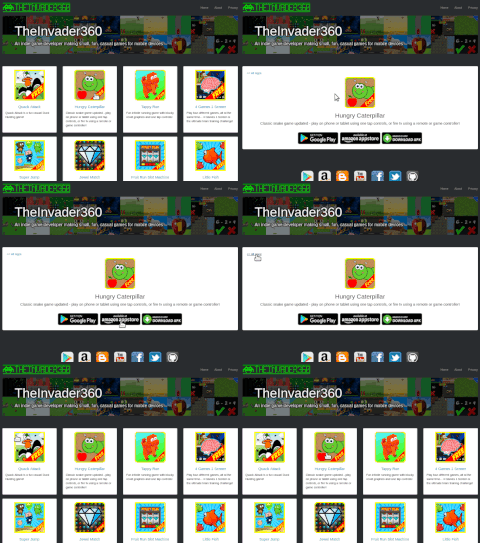
http://www.theinvader360.com

3) I actually released something on Google Play! Don't get too excited, it's just a Maths Quiz ;) Our eldest loves a maths challenge, and she responds massively well to gamification - anything where she can score 10 out of 10 is a winner. This app was built with her firmly in mind, no countdown clocks or pressure to "guess" the answer, just a simple ten randomly generated questions and taking your sweet time to answer correctly kind of deal. She's consistently scoring 10/10 on each challenge type now, so maybe something with a bit of hazard/risk is called for next... Although it’s a fairly boring "game" to look at, it was actually quite good fun to write. I might write more about it sometime, and maybe try to remember to link to it here...

https://play.google.com/store/apps/details?id=com.theinvader360.quiz.maths

4) I wrote a procedural maze generator and cobbled together a basic maze game. I never got round to polishing and releasing the app, but it’s installed on the living room fire stick and the girls like playing it every now and then :)


5) I fiddled about with PyGame and built a Lunar Lander game. This project was kicked off at a local nerd club gathering back when such things were possible, great fun! Oh how I miss being quiet and antisocial in a room full of grown adults, it’s just not the same being quiet and antisocial in the comfort of your own home.


6) My six year old and I collaborated on designing a rule set for a pen and paper tabletop game (SiTTeRS). I had originally planned to turn this into an app, but figured we liked it as it was - a low tech, two players in the same room, real time, physical pen and paper and a dice kinda deal, so I dropped the computer simulation aspect and kept it strictly low tech.

https://github.com/TheInvader360/SiTTeRS

7) Nothing at all to do with games, but I wrote an extremely minimal headless Go application fronted by an equally minimal Vue.js frontend. Not particularly useful - you can achieve the end result as it stands in vue alone, but I liked getting the two parts to work together.

https://github.com/TheInvader360/checklist-frontend-vuejs

8) I built a very simple Memory game using Go and the Ebiten library. I’ve built an executable to run on my laptop, and an apk to install on our various android touch screen devices. This isn’t destined for proper app store release, but feel free to grab it from GitHub!

https://github.com/TheInvader360/simple-memory-game

9) I started building a small Dungeon Sweeper game. No idea why I didn’t finish this, I probably should at some point, the scope is super tiny compared to the Simple RPG mentioned up top. It would also make a nice little fantasy console game. I might come back to this at some point...


10) I read about the Pico-8 a while ago and found the whole subject of fantasy consoles to be quite fascinating. I’d have killed for that kind of dev environment back in my Spectrum days! Then a couple of days ago I discovered the TIC-80... It’s free as in beer, free as in speech, and it supports JavaScript... Sold! I ported a nice Pico-8 tutorial to the TIC-80, and in a single day I had a crappy “game” that could be played on the living room TV using an Xbox One controller, and via the web using keyboard controls (cursor and “z” keys replacing the d-pad and “a” button). I can see myself spending a lot more time tinkering with these fantasy consoles :)
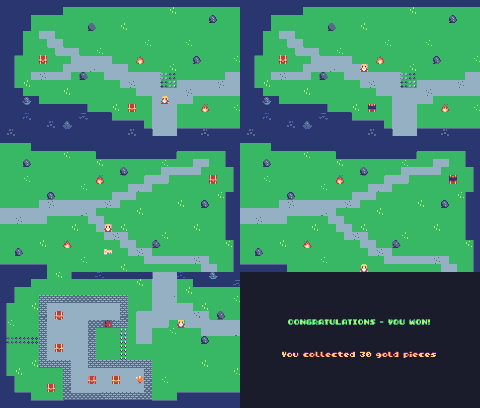
https://github.com/TheInvader360/explore-tic80-js

It strikes me that most of the projects I've enjoyed playing with recently have been quite small and short lived. I've aimed to spend only a day or two's worth of spare time on each, with the aim of getting something minimal and functional finished in that time. Pretty much the Ludum Dare rules really. This has been the case with pretty much everything other than the unfinished simple RPG game (no matter how “simple”, it’s still nowhere near a weekend project!).

I have lots of ideas for future projects. I’d like to finish the Simple RPG and Dungeon Sweep games at some point. I might write a completely pointless static blog/CMS engine, just because (add it to the heap of others out there that nobody wants or needs) :D I’d like to write some Spectrum / NES / Game Boy ROMs (maybe some remakes or demakes). I’d also like to see if there’s anything fun I can do with some of the old hardware we have lying around (Spectrum, Game Boy, DS, PS2, PSP, Wii, etc). I have a Raspberry Pi 3 that is pretty much a dedicated RetroPie machine - it gets played with more than the Xbox One, but maybe I should do more with it. If I’m feeling particularly masochistic I might spend some time on lower level stuff than I’m used to, maybe some assembly is in order :) I’d also like to spend some more time playing with fantasy consoles like the TIC-80, just because it’s fun...

Then there’s the huge subject of moving on from teaching our children traditional languages, science, and maths, and sprinkling in a little bit of computer science. There will be some Scratch and Python in my future for sure, and I can’t imagine any better teaching method than making games. It’s gonna be fun! :D

So yeah, I’m still alive, I’m not really focused on publishing new games to Google Play any more, but I do still love making and playing games and little educational doodads and thingermawotzits.

Until next time, au revoir!

Saturday, 27 December 2014

Sensory - a cause and effect light show app

While testing my latest game (Jewel Match Blitz) it became apparent that TheInvaderOne (my 9 month old daughter) was very interested in what was going on. She has always been interested in the laptop, but the phones and tablets with their sounds and bright coloured lights and tappable screens took it to another level! Testing Jewel Match Blitz soon became quite a challenge! :) I'd hand her the device to play a little, and she had great fun until it was game over - at 9 months old she was never going to be particularly great at playing a strategic action puzzle game so the game overs came thick and fast!

https://play.google.com/store/apps/details?id=com.theinvader360.jewel.match.blitz.game.free.android

The experience got me thinking about what kind of app would be suitable for a baby. TheInvaderOne loves touching the screen and seeing something happen, and feedback in the form of sound effects and bright lights never fail to raise a smile. I created a very small demo app for her using the particle effect already used in Jewel Match Blitz. When you touch the screen a particle effect is triggered at that position, keep touching and more particles are triggered. The app is multitouch enabled so up to 10 points can spawn particles in assorted colours simultaneously. She absolutely loves it!

https://play.google.com/store/apps/details?id=com.theinvader360.sensory.app.free.android

I soon realised that other babies, and potentially SEN children and adults with various learning difficulties, special education needs, and/or disabilities could also benefit from the Sensory app, so I decided to package it up and make available on the google play app store. It is 100% free and is not monetized in any way, ads in an app targeted at users with limited understanding where the aim is to randomly tap the screen would be extremely bad karma! You can find the app here - https://play.google.com/store/apps/details?id=com.theinvader360.sensory.app.free.android

I also figured that there are a few interesting principles involved in this tiny app that might mean it's of interest to other developers, especially those getting started with LibGdx. The app touches on particle effects, object pooling, multitouch, screen transitions, scene 2d ui, the asset manager, etc. The excellent Simple Game example touches on most of the main areas involved when making a basic game (assets, game loop, input, draw, sound). I think the Sensory app builds on that foundation to illustrate simply and clearly how to handle some of the more intermediate LibGdx features. You can find the open source project on github, hopefully it will be of interest to fellow developers interested in making games with LibGdx - https://github.com/TheInvader360/sensory

I'd be over the moon to hear that the little "side effect" offshoot of Jewel Match Blitz ended up helping you in some way, so please leave a 5* review of the app if you can (and maybe leave something in the comments here too!)

Monday, 10 June 2013

One million installs!


1,066,345+ users have installed my LibGDX Android games :)

Due to reporting lag that number is a few days out of date, and it doesn't include installs from third party scraper style stores, so the real number will be a little higher, but I can safely say I have over a million installs in total. Awesome :)

So, how do the various markets stack up?

Sunday, 26 May 2013

Street Race Swipe LibGDX Scene2D Tutorial


I have been meaning to write a LibGDX Scene2D tutorial for some time now (ever since my Quack Attack FREE Duck Hunt Game got ridiculously popular). The problem has been finding the time, instead of writing blog entries I've been making games!

I had a great idea for a multitasking game, play four independent games at one time to train your brain and test your ability to multitask. The result was my 4 Games 1 Screen FREE Brain Training Game. I built this game as four separate games from the outset, with the intention of possibly building further on each minigame and releasing as standalone apps. The first of these standalone apps is Street Race Swipe Racing Game, which brings us neatly to the point of this article...


Street Race Swipe Racing Game is such a simple game at its heart that it seems like an excellent candidate for a tutorial article :) I remember being massively impressed by the example SimpleApp on the LibGDX wiki when first starting out, there was so little to it but it touched on all the basics of what is needed to make a game. I'm hoping this mini project will be almost as simple and just as helpful to others!

Wednesday, 15 May 2013

4 Games 1 Screen - Musings on mobile game control


So often I hear that players hate onscreen controls on touch devices. No physical button means no tactile feedback to let you know you are 'touching but not pressing' a button. This fundamentally different interface means the traditional joystick / d-pad control scheme can no longer be the de facto standard for gaming controls across all platforms - replicating "up down left right a b start" on a phone or tablet is far from ideal (but an ouya or gamestick is another matter entirely ;)).

In my latest game, 4 Games 1 Screen, I try to make the most of a tricky situation. I've embraced the android mobile platform and the control options it offers. Our phones and tablets have accelerometers and touchscreens, the old nintendo and sega machines did not, it's time to think outside the box and make the most of these features.

4 Games 1 Screen is a challenging brain training game, the aim is to multitask by playing four games at one time, and avoid making too many mistakes. Make too many mistakes and it's game over. Each game is kept relatively simple for two reasons - first the game has to have a single objective and control method, second you have to be able to play four of these things at once so too much complexity would be too distracting for the player.


The mini games are:

  • Asteroid Attack - Tilt to steer your ship, asteroid collisions damage the shields, and when the shields are gone - gameover man, gameover!
  • Tap Jump Cowboy - Classic infinite scroll platform game (like canabalt, and gemserk's excellent vampire runner) tap the screen to jump, save the cowboy from running into the campfires!
  • Speedy Sums Math Master - Fully engage the left side of the brain, evaluate the math problem and mark it as correct or incorrect... You not only lose a life when you get it wrong, but also when you run out of time - so think fast!
  • Street Race Swipe - Swipe up or down to change lanes in this fast and furious racing game, avoid crashing into the other sports cars, too many bumps and your car will explode!


Each game can be played independently (full screen) in practice mode, but the real aim of the game is to play them all at once - the game is called "4 Games 1 Screen" afterall :) I find it fun, addictive, frustrating and challenging. The frustration is what makes it so addictive haha, I see gameover and immediately try again to "do it right this time" :)

No onscreen controls, and a game that would not really be possible on traditional gaming platforms, this is truly a mobile game designed for mobile devices. I hope you go on to check it out (it's FREE, so why not!) and if you also like making your own mobile games that you might consider some of the thought behind the concept - don't lament the lack of physical controls, instead make the most of what is available!


Finally, does this mean that I won't ever release a mobile game with onscreen controls? No. Definitely not. A future project will be a traditional platformer, with android enabled consoles like the ouya and gamestick firmly in mind. I will no doubt make a mobile version of this game with onscreen controls (it would be silly not to). I'm not against onscreen controls, I'm against not thinking up interesting ways to make the most of what the mobile platform offers. I believe a platformer will only work well with traditional controls, but we don't always have to make traditional games :)

Happy gaming boys and girls!

Sunday, 10 March 2013

Scene2D Investigation... Result: Quack Attack Free Duck Hunt Game!


I started looking into LibGDX Scene2D recently. No real reason, other than it looked like it could be something interesting to learn, so why not! :) Best way for me to learn is to just get stuck in, so I got to work on a Duck Hunt tribute, and learned as I went along...

It's clear that Scene2D UI is the way to go for menus and the like, so much cleaner than my past approach. Scene2D UI combined with table-layout makes setting up menus and HUDs a breeze. Even better, tweaking layouts becomes pain free, a real bonus! I'll certainly be using it again in future games.

As for making use of Scene2D in the game itself (over and above the HUD), it was tricky to start with... All the tutorials I've read so far have advocated the MVC approach, and it seems that MVC is not really possible when using Scene2D (the model and view are tightly coupled). Still, I've not been doing this long enough to be stuck in my ways, so I figured I could just ignore some of what I'd learned in my earlier projects and just go with the Scene2D flow.

I was surprised that there aren't more tutorials available on the subject to be honest, but I muddled through with various bits and pieces I could find. The most valuable resource when getting started was the LibGDX suite of tests, they are always a good starting point when looking at something new. The official wiki was helpful too. It's a bit presumptuous to think that I'm in a position to write tutorials on the subject (due to me being a newbie myself), but I think I'll post a few code snippets in the coming weeks to share some getting started tips, maybe even an open source step-by-step mini game "how to" if I have the time.

I like how Scene2D lets you encapsulate Actor behaviour in its own act() method, it's pretty cool just instantiating an Actor and then just leaving it to its own devices. My first Scene2D game (Quack Attack) has the game logic class spawn a Duck object at various intervals, the Duck class itself keeps track of how it should behave (overridden act() method sets various actions for the duck to perform dependent on its current state), and it also takes care of drawing itself via the overridden draw() method. It's really nice to be able to look at that single Duck class and immediately "get" exactly what a duck will do in the game, without having to look at various other classes. I guess this is one of the main Scene2D strengths, but on the flipside it's what makes MVC impossible...

I'm sure the coupled view and controller will make things difficult on larger more complex games, but for simpler games I don't think it's a big problem. I guess if I were ever to try porting a Scene2D heavy game to a different platform it'd be a problem too, I am pretty sure porting Racing Game or Evil Monkey Touch Defense or Zombie Game to XNA would be pretty straightforward (if we ignore the tilt/touch control issue), but porting Quack Attack to a library without a similar scene graph implementation would not be so straightforward (would probably have to port the whole of Scene2D too!). Again I don't really care about that right now as I'm focusing on Android only, so I think it's quite likely that I'll be using in-game Scene2D in the future.

I've just published my first Scene2D game on Google Play, it's totally free (ad supported), so feel free to install and check it out. If you like it, I always appreciate a nice rating/review :) Check it out here: https://play.google.com/store/apps/details?id=com.theinvader360.duckhunt.quackattackfree


I think it turned out quite well, and am pleased with what was achieved in a relatively short amount of time. Keep an eye out for future blog posts featuring mini Scene2D tutorials if you're interested in that kind of thing :)

Until next time - happy gaming, and happy game developing!


Sunday, 27 January 2013

Monkey Magic!

UPDATE - As a result of a request from Fox, this game has been removed from the Google Play market. I may create a new version at some point using all original graphics (i.e. not the Family Guy monkey), but in the meantime why not check out one of my other games?

I released a new free game recently - Evil Monkey Touch Defence. You control a "good" Evil Monkey / King Kong type character, his job is to try and protect the tower from incoming missiles!


This was an experiment in creating the simplest possible control scheme for a casual game, while still making a game that's good fun to play. When you touch the screen the monkey starts dropping his aim, when you release the screen he fires. No buttons, no tilt, no nothing, just touch and release anywhere on the screen to control the game - it couldn't get any simpler! The longer you survive the faster the missiles get, and the more missiles you destroy the higher your score, simple and addictive fun...

You can check out Evil Monkey Touch Defence here. I'd love it if you would leave a nice rating or review if you like the game :)


On the subject of free monkey based casual games for android... A friend of mine recently released his first game, you can check out his Monkey Game here - it's a fun casual physics game that uses Box2D behind the scenes. There's nothing in the least bit evil about this monkey, he just wants to eat his fruit (and not get eaten by a croc!)


Monday, 17 December 2012

Tower Defence - Slacker's Diary


I've been slacking recently. Between work, Christmas preparations, and home improvements, there's not been a whole lot of time left over to work on Android games. Anyway, that's enough of the excuses, question is - what am I going to do about it?

I've made a little progress on Tower Defence, but the plan is to put it on the back burner for now, keep working on it whenever I have a nice block of time to dedicate to it, but if I only have an hour or so available at a time to work on more trivial projects instead. I love the momentum that builds up when working on really small simple games, and I'm hoping to get a few of these little games started and finished in the next few months, and just keep chipping away at TD as a longer term project.

Here's a video of the tower defence game as it stands:


Most of the basics are there really, but getting the game finished involves quite a few tasks, not all of them trivial - adding enemy waves, turret upgrades, multiple enemy types, multiple turret types, lots of level maps, level unlocking, graphical improvements, game balancing, etc. I might put an early unfinished version of the game up on the market at some point, maybe with rough graphics, just a handful of levels, and not the best balancing, but I worry that if I do that I might never finish the game properly!

On a positive note, keep your eyes peeled for a new project starting soon! :)

Tuesday, 20 November 2012

Tower Defence - First Progress Report


My last post was very wordy. This one should make up for that...

Here's what I've got so far:


It's starting to look a little like a TD game :)

Next up - I think it's time to get them turrets a'shootin!


Saturday, 27 October 2012

Zombie Survival - now available free on google play!


The question was - Can I make a game in a weekend? The answer was no. Or yes. Or, well... maybe. Kinda. I don't know...

Last Friday I started work on a totally new game - Zombie Survival. By the end of the day Saturday, I did have a playable "game". Or more accurately I had a working game mechanic. There was a good guy, zombies, an objective, and it was fun to play, it even looked pretty good. I guess that could be called a game. Except, it can't. Not really.


A game is more than just the mechanic and the graphics. The mechanic is what really matters at the end of the day, but there's a lot of additional stuff that you have to pack into your game no matter how simple/casual the market - this stuff isn't really optional anymore.

It took an additional four evenings and nearly a whole Saturday morning and early afternoon of effort before Zombie Game was ready for the marketplace. In that time I added screens for highscores, help, gameover, paused, etc, saved/read settings and highscores to/from persistent memory, improved the look and feel throughout, implemented sound and music, did some refactoring (I'm learning as I go, so tend to clean up / rework as and when I have a lightbulb moment), playtested and tweaked difficulty to get things just right (the fine line between challenging and frustrating is where the fun is found!), carried out lots of testing on multiple devices, and did a little bug fixing.

All in I reckon it took about 45-50 hours effort spread over 8 days to go from nothing to published, and I'm really pleased with that. But 48-ish hours effort is not the same as 48 hours elapsed time (lots of problems solved themselves in my head overnight, the subconscious mind is a wonderful thing!), I guess Ludum Dare will have to wait.

I'm sure my girlfriend will be glad to know that I'll be giving it a rest for at least a week or two now... A full time job plus putting in full time hours on an android game resulted in this being quite the antisocial week! Anyway, the game is up on google play, and it's a free download, so why not give it a go? Cute zombie fun just in time for halloween :)


Sunday, 21 October 2012

Making a game in a weekend… Can it be done?


UPDATE - Download the finished game for free here!

I’d like to enter a Ludum Dare 48 hour competition one day, but I don’t think I’m ready yet. Create a finished game in a single weekend, sounds like a monster task!
This weekend I decided to give it a test run, see how far I can get in a couple of days. The answer is – further than I’d have guessed! Here’s a runthrough of the process…


Saturday, 25 August 2012

First 3D project

As expected, I ended up starting a new project... It's quite a leap up from what was achieved in Race Game.

Laptop video (shows 2D and 3D rendering plus raw map files):


Android video (shows smooth 3D rendering on android device):


Next steps will include:
  • Control scheme to suit android devices
  • Nice 3D models for keys, treasures, etc
  • Animated opening doors (quite how is a mystery!)
  • Cartoony / cutesy graphics and sound
  • Level select screen
  • Level complete screen
  • Game complete screen
  • Efficiency improvements
  • Lots more level maps
I think I'm going to drop the 'score' aspect, instead an achievement based level rating sounds good... Finish level for one star and ability to progress to next level, finish level having collected all treasure awards additional star, finish level in under X seconds awards additional star. Quite easy to progress through the levels, but replays required to get 100% perfect three star level rating.

Interestingly, Race Game has a fair number of android 1.6 users. Considering how few 1.6 devices exist, it's clear that there are people out there with low spec devices that want to play casual fun games. With this in mind, I'm going to keep striving for as near global compatibility as possible.

This game will be an arcade/maze/puzzler/adventure mashup. I'm going to leave out enemies, make it more about getting to the exit quickly, exploring, etc. This simplifies things for me, and should result in a game that appeals to quite a wide market.

A separate game that introduces first person shooter elements (zombies, weapons, and a darker art style) could be built on top of this base later on.

The code is freely available here, and there's a demo up on google play - check it out!


Sunday, 12 August 2012

Racing Game - Powering on ahead!

I've neglected the blog for a few days, spent my time working on the app rather than writing about it. As a result, quite a lot of progress has been made in the past few days :)

Here's a video of the app as it currently stands:


Tuesday, 7 August 2012

Racing Game - Too early to go alpha?

I've still not taken care of my housekeeping tasks, but I do have a fully functional HUD now - this makes me feel a little guilty but a lot happy :)


Monday, 6 August 2012

Racing Game - HUD and Timer


As expected, I left the housekeeping for a while and carried on with the fun stuff :) There's a couple of things worth a little mention today:
  1. How to render a heads up display
  2. Introduction of a new timer class

Friday, 3 August 2012

Racing Game – Bobo’s end


In my last post I mentioned that having play tested a little I wasn’t really satisfied with how the game played. The levels were too blocky, character movement felt like it was in the wrong direction, and the story/theme was a bit forced and rubbish.
The simplest way to reduce the blockiness of the level would be to simply shink the tile sizes. Creating loads of block objects seemed a bad idea though (taking it to the extreme there could be one per pixel!). Instead I went back to the drawing board to rethink the level concept. Here’s a simple definition of a level:
  • A level row is 10px high and 240px wide
  • The viewable portion of the level is 320px high (32 x rows)
  • An example row could be: 80px wide grass, 80px wide road, 80px wide grass
  • The road sections are the same width in all the levels rows
  • The left grass section can increase/decrease in width by up to 4px per consecutive row
  • The right grass section takes up the remainder of the levelRow width
With these rules defined, I went on to rewrite the level generation code:
 public Level(int screenWidth, int roadWidth, int roadOffset, int levelLength, int rowHeight) {  
  this.screenWidth = screenWidth;  
  this.roadWidth = roadWidth;  
  this.roadOffset = roadOffset;  
  this.levelLength = levelLength;  
  this.rowHeight = rowHeight;  
  this.levelRowRoadOffset = new int[levelLength];  
  offroadAreas = new Array();  
  generateOffsets();  
  generateOffroadAreas();  
  generateFinishLine();  
  car = new Car(new Vector2((screenWidth/2)-(Car.WIDTH/2), 20));  
 }  
 private void generateOffsets() {  
  for (int row=0; row<levelLength; row++) { // for each row in the level  
  levelRowRoadOffset[row] = roadOffset;  
  // generate a random integer (between -4 and +4)  
  int modifier = (randomGenerator.nextInt(9)) - 4;  
  System.out.println("Modifier: "+modifier);  
  // apply modifier offset provided road would remain in bounds  
  if ((roadOffset + modifier >= 1) && (roadOffset + modifier + roadWidth <= screenWidth)) {  
   roadOffset += modifier;  
  }  
  }  
 }  
 private void generateOffroadAreas() {  
  for (int row=0; row<levelLength; row++) { // for each row in the level  
  OffroadArea leftGrass = new OffroadArea(0, row * rowHeight, levelRowRoadOffset[row], rowHeight);  
  offroadAreas.add(leftGrass);  
  OffroadArea rightGrass = new OffroadArea(levelRowRoadOffset[row] + roadWidth, row * rowHeight, screenWidth - (levelRowRoadOffset[row] + roadWidth), rowHeight);  
  offroadAreas.add(rightGrass);  
  }  
 }  
 private void generateFinishLine() {  
  finishLine = new FinishLine(0, levelLength * rowHeight, screenWidth, 40);  
 }  

Bobo became Car, Block became OffroadArea, and there were a few little changes to these classes, nothing really worth mentioning here. The drawing routine in GameScreen changed a little:
 for(OffroadArea offroadArea: level.getOffroadAreas()) {  
  spriteBatch.draw(grassTextureRegion, offroadArea.getBounds().x, offroadArea.getBounds().y, offroadArea.getBounds().width, offroadArea.getBounds().height);  
 }  

If you’d like to see the full extent of the changes made, the complete source can be found here.


What next?

Lots to do…
  • I can think of a couple of of efficiency improvements to do – there’s no sense in checking the whole level for collisions, and the same goes for rendering rows that are offscreen (espcecially those you have passed and won’t possibly see again).
  • I think maybe there should be subclasses of OffroadArea, ice, grass, rocks, finish line, etc, all with different behaviour, but for now I’ll leave things as they are, “it aint broke, why fix it”.
  • The level may need a little tweaking, certainly in later levels the game would need to get tougher. Deceleration when offroad needs tweaking too, it’s too sudden at the moment.
  • There’s a cheat possible where if you leave the screen bounds you race ahead, I’ll need to constrain car to world bounds.
  • The timer needs to be reintroduced, current time should be displayed oncreen, and high scores should be saved to persistent memory.
  • A delay before starting the race would be nice, maybe a traffic light graphic or “3, 2, 1, Go!” message.
  • The finish line could be improved, maybe a nice animation of the car driving offscreen?
  • Sound effects would be nice.
  • Maybe the car should rotate a little when ‘steering’?
  • Maybe some dirt particles should get kicked up when the car is offroad?
  • I’m already thinking about the third dimension. I need to forget about this for now if I ever want to produce a finished game. Maybe this game should be RaceGame2D, and RaceGame3D could be another project for another time!
There’s no doubt loads more to do that I’ve not thought of yet. I think I have plenty to be getting on with though! Don’t really know what I’ll tackle next, so the next update will be a lucky dip! Until then, here’s a bonus video of the basic game as it currently stands :)
          

Thursday, 2 August 2012

Run Bobo Run – Basic game mechanic complete


This update was good fun to write, feels like quite a lot was achieved in not a lot of code :) I've now implemented collision detection, tilt control, a level timer, and world forces (gravity and terminal velocity).

Collision Detection


I added a bounding box to both the Bobo and Block classes. Bobo's bounds are updated whenever he is updated, this is not necessary in the case of static Block objects. The main game loop calls checkCollisions() each cycle, this is an inefficient but perfectly functional collision checking method:

private void checkCollisions() {
   int numBlocks = level.getBlocks().size;
   for (int i = 0; i < numBlocks; i++) {
      Block block = level.getBlocks().get(i);
      if (block.getBounds().overlaps(level.getBobo().getBounds())) {
         level.getBobo().hitBlock();
      }
   }
}

If any Block bounding boxes overlap Bobo's bounding box, call bobo's hitBlock() method, which slows him right down:

public void hitBlock() {
   velocity.set(0, -20);
}

The efficiency of the collision checking routine could be massively improved by only checking for collisions with nearby blocks that Bobo could possibly collide with (as opposed to every single block in the level), but I'm lazy and this will do the job for now...

Tilt Control


I made some changes to the handleInput method:

private void handleInput(float deltaTime) {
   if (Gdx.app.getType() == Application.ApplicationType.Android) {
      level.getBobo().moveBobo(deltaTime, Gdx.input.getAccelerometerX() * -50);
   }
   if (Gdx.app.getType() == Application.ApplicationType.Desktop) {
      float moveBobo = 0;
      if(Gdx.input.isKeyPressed(Input.Keys.LEFT)) moveBobo = -100f;
      if(Gdx.input.isKeyPressed(Input.Keys.RIGHT)) moveBobo = 100f;
      level.getBobo().moveBobo(deltaTime, moveBobo);
   }
}

The if statements allow for platform specific controls - on Android use the accelerometer, on the desktop use the cursor keys. The user input results in a call to Bobo's moveBobo() method:

public void moveBobo (float deltaTime, float moveBobo) {
   velocity.x = moveBobo;
   update(deltaTime);
}

Basically, alter Bobo's velocity in accordance with the passed in parameters, then call bobo's update method:

public void update(float deltaTime) {
   if (-velocity.y < TERMINAL_VELOCITY) {
      velocity.add(Level.gravity.x * deltaTime, Level.gravity.y * deltaTime);
   }
   position.add(velocity.x * deltaTime, velocity.y * deltaTime);
   bounds.set(position.x, position.y, WIDTH, HEIGHT);
}

If Bobo has not yet reached his terminal velocity on the y-axis, apply acceleration/gravity (a property of Level - "gravity = new Vector2(0, -30);") to his velocity, then update his position in respect of his velocity (and the time since last update), and update his bounding box to match his new position.

Level Timer


Finally, there's a timer to keep track of how long it takes to get to the end of the level. Currently it just outputs a message to the console, but that's enough to prove it works.

When the level is created, the current time is recorded (startTime = TimeUtils.nanoTime();).
checkGameover() is called on each cycle of the main game loop:
private void checkGameover() {
   if (level.getBobo().getPosition().y <= level.getLevelEnd())
      System.out.println("Finished level in "+(TimeUtils.nanoTime()-level.getStartTime())/1000000000+" seconds!");
}

And here's the Level getLevelEnd() method:
public int getLevelEnd() {
   return -((levelHeight * Block.HEIGHT)-Bobo.HEIGHT);
}


That's it, nothing more to it :)

What Next?


At this point, the basic game mechanic is complete. I could (should??) go on to implement the other screens, the in game heads up display, the high score recording... But, err, I'm not happy with the game. The setting/story is a bit too convoluted, the uniform blocky walls are a bit rubbish, and the tilt controls feel a bit weird when controlling a character that's facing you and running down the screen.
I'm going to revisit the level generation code to get things looking a little less blocky, change the direction of play to up not down, and maybe change the setting from a running clown to something a bit more "normal", a racing car on a road, a speed boat on a river, or the old classic - a helicopter in a cavern.
You can checkout the game in its current state here if you like. It should look quite different come my next update!


Tuesday, 31 July 2012

Pulling the level generation code into Run Bobo Run


I didn’t expect to be posting again for a few days, but it turns out smooshing the procedural level generation algorithm into the LibGDX project was really straightforward, so I figured I might as well post a little something about it today :)
I added the Level class that I posted previously, and just made a few little changes to it:
  1. I changed char[][] to int[][], no real reason for this, either would be fine
  2. I pulled in Bobo and Array<Block> from GameScreen
  3. I replaced the console print method with a method to translate levelLayout to blocks placed in the level
  4. Finally, a constructor pulls all this together to allow easy creation of a level with a Bobo in it
I could have included block creation in the generateLayout method (under the “levelLayout[row][col] = ’0′;” line) and left out the translateLayout method completely, but separating out layout generation and translation to world co-ordinates seemed like a good idea.
Here’s the full source for Level.java
 package com.mrdt.runboborun;  
 import java.util.Random;  
 import com.badlogic.gdx.math.Vector2;  
 import com.badlogic.gdx.utils.Array;  
 public class Level {  
  private Bobo bobo;  
  private Array blocks;  
  private Random randomGenerator = new Random();  
  private int levelHeight, levelWidth, pathWidth, pathOffset;  
  private int[][] levelLayout;  
  public Level(int levelHeight, int levelWidth, int pathWidth, int pathOffset) {  
  blocks = new Array();  
  generateLayout(levelHeight, levelWidth, pathWidth, pathOffset);  
  translateLayout();  
  bobo = new Bobo(new Vector2((GameScreen.WIDTH/2)-(Bobo.WIDTH/2), 0));  
  }  
  private void generateLayout(int levelHeight, int levelWidth, int pathWidth, int pathOffset) {  
  this.levelHeight = levelHeight;  
  this.levelWidth = levelWidth;  
  this.pathWidth = pathWidth;  
  this.pathOffset = pathOffset;  
  this.levelLayout = new int[levelHeight][levelWidth];  
  for (int row=0; row<levelLayout.length; row++) {  
   for (int col=0; col<levelLayout[row].length; col++) {  
   if ((col < pathOffset) || (col >= pathOffset+pathWidth))  
    levelLayout[row][col] = '0';  
   }  
   int stepModifier = (randomGenerator.nextInt(3)) - 1;  
   if ((pathOffset + stepModifier >= 0) && (pathOffset + stepModifier + pathWidth <= levelWidth))  
   pathOffset = pathOffset + stepModifier;  
  }  
  }  
  private void translateLayout() {  
  for (int row=0; row<levelLayout.length; row++) {  
   for (int col=0; col<levelLayout[row].length; col++) {  
   if (levelLayout[row][col] == '0') {  
    Block block = new Block(new Vector2(col*Block.WIDTH, -row*Block.HEIGHT));  
    blocks.add(block);  
   }  
   }  
  }  
  }  
  public Bobo getBobo() {  
  return bobo;  
  }  
  public Array getBlocks() {  
  return blocks;  
  }  
 }  

As a result of introducing the Level class, the GameScreen class needed a little tidying up.

Project is up on github, feel free to check the project out, have a play with it, and comment if you have any ideas or suggestions :)


Monday, 30 July 2012

Getting Started with LibGDX


Exciting times… By the end of this post we’ll have something that loosely resembles the beginnings of a game! Not only that, we’ll be able to run it on the desktop or if we like on android (either a real phone or the emulator).
It really will be just the beginning though… Today’s focus is on creating a game world comprised of block objects, adding a player controlled object (Bobo) to the world, and locking the camera onto Bobo such that the level ‘scrolls’ and Bobo always remains within sight. Later we’ll deal with collision detection, game winning states, scoring, etc, but for now let’s just take it one step at a time!

Getting Started with LibGDX

I’ll assume you already have your environment set-up. If not, follow the instructions here, and come back when you’re done :)
Ok, now generate a new shell libgdx project using the gdx-setup-ui.jar. These are the values I used:


Next, fire up eclipse, file > import, general > existing projects into workspace, set root dir to wherever you specified when creating the shell project (in my case D:\Workspace), make sure all three projects are ticked, then click finish. If it all went well you should see the three projects in project explorer. Right click the desktop project, opt to run as java application, click on the Main item in the dialog, then ok. The default hello world app should open, it looks a bit like this:


Assets

I created a couple of sprites to get us started, bobo.png and block.png (both 16x32px per original spec). These should be placed in the assets/data dir of the android project. While you’re at it, delete libgdx.png, you won’t be needing it again.

Manifest

Open AndroidManifest.xml (it should be in the root of the android project). For now, all we need to do here is change the android:screenOrientation value from “landscape” to “portrait”.

Bootstrap

I renamed MainActivity.java (android project src) AndroidStarter.java, and Main.java (desktop project src) DesktopStarter.java. Just personal preference thing. Nothing needs changing in the android starter, but in the desktop starter we should set cfg.width to 240, and cfg.height should remain as 320, this just means the app we preview on the desktop will default to the target resolution of 240×320.

Getting down to business

With the initial setup out of the way, we can now get on with the business of making our game.
We’re only implementing the GameScreen right now, but we’re aware that there will be more screens added later on, so we should probably plan for that from the outset. There’s a nice little article here on the subject, makes a lot of sense to me so let’s do it!
Open RunBoboRun.java, delete all the contents, and replace with the following:

 // In anticipation of further screens being added, I followed this suggestion:  
 // http://code.google.com/p/libgdx-users/wiki/ScreenAndGameClasses  
 package com.mrdt.runboborun;  
 import com.badlogic.gdx.Game;  
 public class RunBoboRun extends Game {  
     GameScreen gameScreen;  
     @Override  
     public void create() {  
         gameScreen = new GameScreen(this);  
         setScreen(gameScreen);  
     }  
 }  


The libgdx-users wiki article does a great job of explaining so I won’t bother going into it any further here.

Game Objects

There are a couple of very obvious game object candidates – the world is made up of Blocks, and Bobo moves around the world, let’s create a class for each…

 // A simple class for Block objects  
 package com.mrdt.runboborun;  
 import com.badlogic.gdx.math.Vector2;  
 public class Block {  
     public static final int WIDTH = 16;  
     public static final int HEIGHT = 32;  
     private Vector2 position = new Vector2();  
     public Block(Vector2 position) {  
         this.position = position;  
     }  
     public Vector2 getPosition() {  
         return position;  
     }  
 }  

There’s not a whole lot to the Block class. A couple of constants define the size (measured in pixels), a Vector2 is used to record its position in the world (set during construction), and there’s a position getter/accessor method. That’s all there is too it.

 // A simple class for Bobo, all straightforward apart from maybe update method.  
 // From obviam.net:  
 // We simply add the distance travelled in delta seconds to Bob’s current position.  
 // We use velocity.tmp() because the tmp() creates a new object with the same value  
 // as velocity and we multiply that object’s value with the elapsed time delta.  
 package com.mrdt.runboborun;  
 import com.badlogic.gdx.math.Vector2;  
 public class Bobo {  
     public static final int WIDTH = 16;  
     public static final int HEIGHT = 32;  
     private Vector2 position = new Vector2();  
     private Vector2 velocity = new Vector2();  
     public Bobo(Vector2 position) {  
         this.position = position;  
     }  
     public void update(float delta) {  
         position.add(velocity.tmp().mul(delta));  
     }  
     public Vector2 getPosition() {  
         return position;  
     }  
     public void setVelocity(Vector2 velocity) {  
         this.velocity = velocity;  
     }  
 }  


There isn’t much more to the Bobo class. In fact, looking at the two classes I think maybe there should be a parent Tile object that Block and Bobo extend, but let’s forget about that for now, we can always come back to this later if we like. So what is different about the Bobo class? Put simply, it’s capable of movement. Bobo has a velocity (a Vector2), the value of which is set via a setter/mutator method. On each update Bobo’s position is altered in accordance with his velocity. I pinched the update method from obviam.net, he explains it as follows – “We simply add the distance travelled in delta seconds to Bob’s current position. We use velocity.tmp() because the tmp() creates a new object with the same value as velocity and we multiply that object’s value with the elapsed time delta.”
So far so good. Time to implement the GameScreen!

GameScreen

I’ve said this many times already, but I’ll say it again… I’m learning as I go, and I may not be doing things the “right” way. This class should probably be split into smaller pieces, maybe I should have distinct renderer and controller classes, etc. For now I’m just working on making things work, I can worry about doing things the “right” way later on. When you’re making a game who cares if you did it the “right” way anyway, it just needs to work! With that out of the way, let’s have a look at the code:

 // This basic GameScreen class demonstrates:  
 //  How to create a game level comprised of multiple block objects  
 //  How to create a dynamic bobo object that moves around the level in response to user input  
 //  How to create a 2D camera that follows bobo on the y-axis  
 package com.mrdt.runboborun;  
 import com.badlogic.gdx.Gdx;  
 import com.badlogic.gdx.Input;  
 import com.badlogic.gdx.Screen;  
 import com.badlogic.gdx.graphics.GL10;  
 import com.badlogic.gdx.graphics.Texture;  
 import com.badlogic.gdx.graphics.g2d.SpriteBatch;  
 import com.badlogic.gdx.graphics.OrthographicCamera;  
 import com.badlogic.gdx.math.Vector2;  
 import com.badlogic.gdx.utils.Array;  
 public class GameScreen implements Screen {  
     private static final int WIDTH = 240;  
     private static final int HEIGHT = 320;  
     private RunBoboRun game;  
   private Bobo bobo;  
   private Array<Block> blocks;  
   private OrthographicCamera cam;  
   private Texture boboTexture;  
   private Texture blockTexture;  
     private SpriteBatch spriteBatch;  
     public GameScreen(RunBoboRun game) {  
         this.game = game;  
         boboTexture = new Texture(Gdx.files.internal("data/bobo.png"));  
         blockTexture = new Texture(Gdx.files.internal("data/block.png"));  
         createLevel();  
         // orthographic camera (2D camera) of fixed width and height, larger screens will scale to fit  
         cam = new OrthographicCamera(WIDTH, HEIGHT);  
         // camera focus: x-axis middle of level, y-axis 100px below bobo, z-axis ignored  
         cam.position.set(WIDTH/2, bobo.getPosition().y - 100, 0);  
       spriteBatch = new SpriteBatch();  
   }  
     private void createLevel() {  
         // create bobo and add him to the level  
         bobo = new Bobo(new Vector2((WIDTH/2)-(Bobo.WIDTH/2), 0));  
         // create an array to hold all the block objects  
         blocks = new Array<Block>();  
         // nasty temp cludge to blat out a bunch of blocks... will be replaced by level generation algorithm soon!  
         addBlock(new Vector2(0, 32));  
         addBlock(new Vector2(16, 32));  
         // -- add lots more blocks here if you like...  
         addBlock(new Vector2(224, -448));  
     }  
     private void addBlock(Vector2 position){  
         Block block = new Block(position);  
         blocks.add(block);  
     }  
   @Override  
     public void render(float delta) {  
         handleInput();  
         // user input has an impact on bobo, so update his state  
           bobo.update(delta);  
           // following bobo update, move camera accordingly (focus rule same as in constructor)  
         cam.position.set(WIDTH/2, bobo.getPosition().y - 100, 0);  
         // clear screen  
           Gdx.gl.glClear(GL10.GL_COLOR_BUFFER_BIT);  
           // call cam.update() after changes to cam (http://code.google.com/p/libgdx/wiki/OrthographicCamera)  
           cam.update();  
           // set projection and model-view matrix after update (http://code.google.com/p/libgdx/wiki/OrthographicCamera)  
           cam.apply(Gdx.gl10);  
           // setProjectionMatrix before drawing sprites (http://code.google.com/p/libgdx-users/wiki/Sprites)  
           spriteBatch.setProjectionMatrix(cam.combined);  
     spriteBatch.begin();  
       for(Block block: blocks) {  
           spriteBatch.draw(blockTexture, block.getPosition().x, block.getPosition().y, Block.WIDTH, Block.HEIGHT);  
       }  
         spriteBatch.draw(boboTexture, bobo.getPosition().x, bobo.getPosition().y, Bobo.WIDTH, Bobo.HEIGHT);  
         spriteBatch.end();       
     }  
     private void handleInput() {  
         // if a valid keypress, respond accordingly (set bobo's velocity such that he moves in that direction)  
     if(Gdx.input.isKeyPressed(Input.Keys.DOWN)) {  
         bobo.setVelocity(new Vector2(0, -100));  
     }  
     if(Gdx.input.isKeyPressed(Input.Keys.UP)) {  
             bobo.setVelocity(new Vector2(0, 100));  
     }  
     if(Gdx.input.isKeyPressed(Input.Keys.LEFT)) {  
         bobo.setVelocity(new Vector2(-100, 0));  
     }  
     if(Gdx.input.isKeyPressed(Input.Keys.RIGHT)) {  
             bobo.setVelocity(new Vector2(100, 0));  
     }  
         // if no valid keypress, respond accordingly (set bobo's velocity such that he does not move)  
     if   
     (!(Gdx.input.isKeyPressed(Input.Keys.UP))&&!(Gdx.input.isKeyPressed(Input.Keys.DOWN))&&!(Gdx.input.isKeyPressed(Input.Keys.LEFT))&&!(Gdx.input.isKeyPressed(Input.Keys.RIGHT)))  
     {  
         bobo.setVelocity(new Vector2(0, 0));  
     }  
   }  
   @Override  
   public void resize(int width, int height) {  
     }  
     @Override  
     public void show() {  
     }  
     @Override  
     public void hide() {  
     }  
     @Override  
     public void pause() {  
     }  
     @Override  
     public void resume() {  
     }  
     @Override  
     public void dispose() {  
     }  
 }  


I think the code and comments (don’t miss the links in the comments!) should make sense without too much further explanation.
On entry we:
  1. Create our assets (in this case our two textures)
  2. Create a level comprised of an array of Blocks and a Bobo
  3. Create a camera focused on Bobo
  4. Create a spritebatch to allow drawing of sprites to screen
The render method can be thought of as the main game loop, it’s called repeatedly while the GameScreen is active. Here’s what we need to do every time render is called:
  1. Handle user input – if a valid key is pressed (or not), set Bobo’s velocity accordingly
  2. Update Bobo
  3. Update camera position (lock on to Bobo)
  4. Draw the sprites to screen
That’s basically it :)
The controls are more than a little bit dodgy (no diagonal movement, and you’re stuffed if your phone has no cursor keys), the ‘level’ is hardcoded, the assets aren’t disposed cleanly on close, and there’s no doubt a lot more that needs tidying up, but this post is getting a bit long so I’m going to leave it there for now. When all is said and done, we have an application that will run on the desktop and on android, and the camera follows Bobo around the world, that’s exactly what I hoped to achieve today, so this seems like a good place to stop.
Here’s a screenshot of the ‘game’ as it stands:


Next post I’ll probably look into pulling in the level generation algorithm, and maybe do some collision detection, or maybe investigate accelerometer controls, I don’t really know yet!